(940) 767-6227
  • Facebook
  • X
  • RSS
  • Facebook
  • X
  • RSS
0 Items
MacTech Solutions
  • Home
  • Managed IT Services
  • Products
    • Mac
      • MacBook Air
        • MacBook Air 13-inch M5
        • MacBook Air 15-inch M5
      • MacBook Pro
        • MacBook Pro 14-inch M5
        • MacBook Pro 14-inch M5 Pro
        • MacBook Pro 16-inch M5
      • iMac
        • iMac 24-inch M4
      • Mac Mini
        • Mac mini M4
      • Mac Studio
      • Mac Pro
      • Apple Displays
        • Pro Display XDR
        • Studio Display
    • iPad
      • iPad
      • iPad mini
      • iPad Pro
        • iPad Pro M4 11-inch
        • iPad Pro M4 13-inch
      • iPad Air
        • iPad Air M2 11-inch
        • iPad Air M2 13-Inch
      • Apple Pencil
        • Apple Pencil (USB-C)
      • Keyboards
        • Smart Keyboard
        • Smart Keyboard Folio
        • iPad Magic Keyboard
    • Apple Watch
      • Apple Watch SE
      • Apple Watch Series 9
      • Apple Watch Ultra 2
    • iPod touch
    • Apple TV
      • Apple TV
      • Apple TV 4K
    • Airpods
      • AirPods Max
      • Airpods Pro (2nd Generation)
      • AirPods 4
      • AirPods 4 with Active Noice Cancellation
      • AirPods (3rd Generation)
      • AirPods (2nd Generation)
    • HomePod
      • HomePod mini
    • AppleCare+
    • Sonos
    • Adobe
      • Creative Cloud for Education
  • Service
    • Apple Authorized Service
    • Remote Support
  • Trade Ins
    • Classes & Events
  • About Us
    • Newsletter Sign Up
    • MacTech Solutions
    • The Team
    • Contact Us
  • Blog
Select Page
The Mac’s Magic Shortcut to Trashing Files and Photos Quickly

The Mac’s Magic Shortcut to Trashing Files and Photos Quickly

by Terry McAdams | Aug 19, 2021 | keyboard shortcut, Mac, productivity, Tip

Sure, you could select a file in the Finder and choose File > Move to Trash or drag it to the Trash in the Dock. Similarly, you can trash selected photos in Apple’s Photos app by choosing Image > Delete X Photos, or by pressing the Delete key, but both of those...
Ever Have Trouble Printing? Try a Different Printer Driver

Ever Have Trouble Printing? Try a Different Printer Driver

by Terry McAdams | Aug 12, 2021 | Mac, Tip, troubleshooting

Some clients have reported problems with HP laser printers failing to print. Sometimes there’s an error. Other times, the print job just disappears into the ether. It’s unclear why this is happening or how widespread it is, but here’s a workaround that can help....
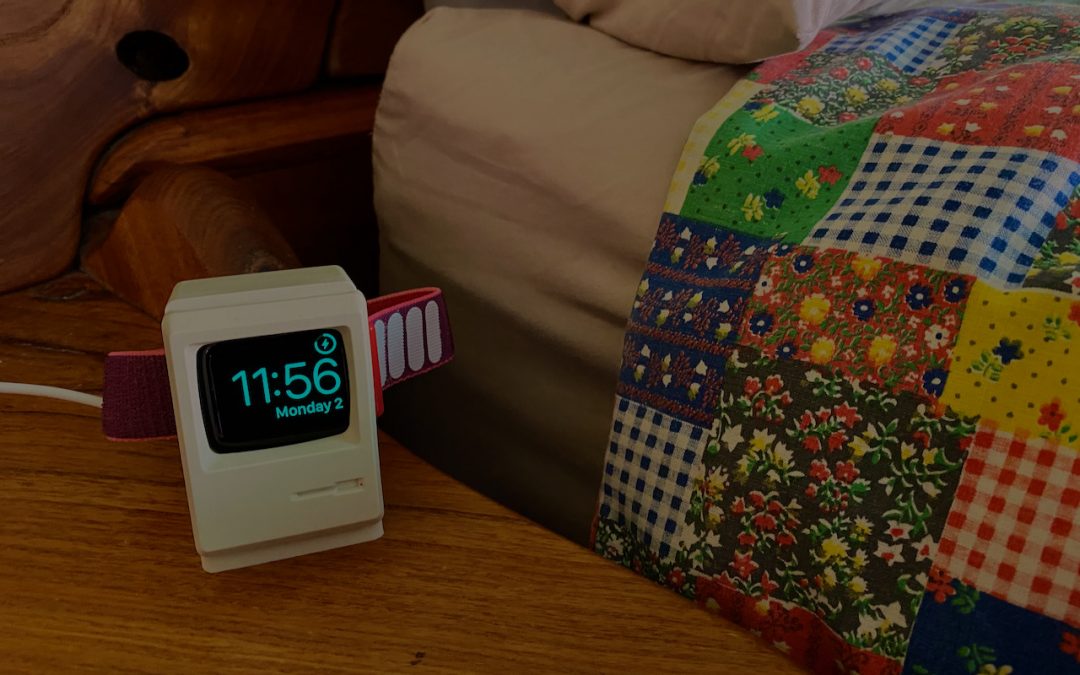
Nightstand Mode Makes Your Apple Watch a Helpful Bedroom Companion

Nightstand Mode Makes Your Apple Watch a Helpful Bedroom Companion

by Terry McAdams | Aug 2, 2021 | Apple Watch, Tip

Most Apple Watch users charge their watch every night, putting it on a charger as part of a bedtime routine. If that’s you, make sure you’re not missing one of the Apple Watch’s best features: nightstand mode. When you enable it in the iPhone’s Watch app, in General...
Disable Unused Sharing Options on Your Mac If You’re Not Using Them

Disable Unused Sharing Options on Your Mac If You’re Not Using Them

by Terry McAdams | Jul 15, 2021 | Mac, privacy, Security, Tip

Many security breaches—even high-profile ones—stem from simple oversight. There’s one spot in macOS that has long been particularly susceptible to such lapse: the Sharing pane of System Preferences. In it, you can enable a wide variety of sharing services, some of...
Live in the Future by Using Apple Pay on Your Apple Watch

Live in the Future by Using Apple Pay on Your Apple Watch

by Terry McAdams | Jul 13, 2021 | Apple Pay, Apple Watch, productivity, Tip

With mask wearing over the past year rendering Face ID ineffective at cash registers, we’ve become fond of using the Apple Watch for contactless payments with Apple Pay. We recommend it highly since it’s so fast and convenient. Once you’ve set up a credit card in the...
Two Important Tips for External Storage Devices

Two Important Tips for External Storage Devices

by Terry McAdams | Jul 8, 2021 | Backup, Tip, troubleshooting

It’s tempting to think that most external storage devices—whether simple hard drives or more complicated network-attached storage (NAS) units—are relatively similar because they all do roughly the same thing. However, a recent problem with older Western Digital My...
« Older Entries
Next Entries »

Archives

Categories

Terms and Conditions   |   Return and Shipping Policy   |   Privacy Policy
MacTech Solutions LLC DBA MacTech Solutions™
Copyright © MacTech Solutions, LLC   |   All Rights Reserved.

The MacTech Solutions logo is property of MacTech Solutions, LLC, a Texas Limited liability company. All other logos and trademarks are the property of their respective owners. Apple, the Apple logo, iPad, iPad Pro, iPod, Mac, MacBook Air, and MacBook Pro are trademarks of Apple Inc., registered in the U.S. and other countries.

Our Location

4020 Rhea Rd, Suite 3B
Wichita Falls, TX 76308
(940) 767-MACS (6227)

Hours

Monday-Friday: 10-6
Saturday: Closed
Sunday: Closed
Terms and Conditions | Privacy Policy

MacTech Solutions LLC DBA MacTech Solutions™
Copyright © MacTech Solutions, LLC   |   All Rights Reserved.

The MacTech Solutions logo is property of MacTech Solutions, LLC, a Texas Limited liability company. All other logos and trademarks are the property of their respective owners. Apple, the Apple logo, iPad, iPad Pro, iPod, Mac, MacBook Air, and MacBook Pro are trademarks of Apple Inc., registered in the U.S. and other countries.