
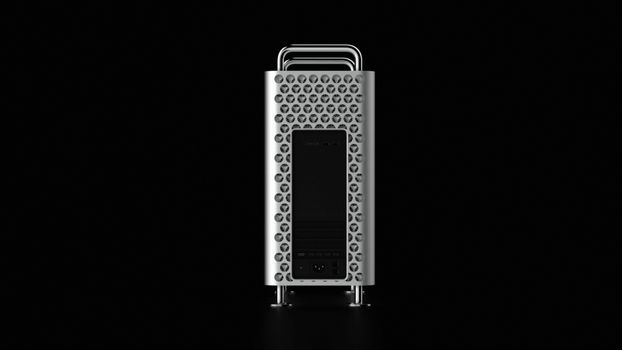
Got a Mac Pro collecting dust? This kit will convert it into a Windows PC
Why the 2019 Mac Pro Has Become an Expensive Orphan
When Apple released the redesigned Mac Pro in 2019, the one nicknamed the cheese grater for its lattice front panel, it was meant to be the last word in professional Macs. It started at nearly six thousand dollars, and fully loaded configurations cost as much as a new pickup. Here in Texoma we’ve seen these machines in video production suites, church media booths, architecture offices, and the home studios of serious hobbyists who bought one expecting a decade of service.
Then Apple moved its entire lineup to its own Apple silicon chips. The 2019 Mac Pro, model identifier MacPro7,1 (model number A1991), is an Intel machine. Apple has said macOS Tahoe is the final major macOS release that will support Intel Macs. After that, owners can expect security updates for a limited time, and then nothing.
That leaves many owners in an awkward spot. The hardware still works, and it’s still fast for plenty of tasks. But resale values have dropped sharply because buyers know where the platform is headed. Selling one locally, whether through Facebook Marketplace in Wichita Falls or a listing aimed at buyers in Lawton or the DFW area, often brings in a fraction of what it cost. Scrapping it feels wasteful, especially when the case alone is one of the best-built computer enclosures ever made.
Running Windows on it isn’t a clean fix either. Apple’s Boot Camp officially supports Windows 10 on this model, and Windows 10 reached end of support in October 2025. Windows 11 isn’t officially supported through Boot Camp, so getting it to work means workarounds that most business owners shouldn’t rely on.
So a lot of these towers end up sitting under desks or in storage closets, collecting the kind of fine red dust that North Texas wind delivers to every room in the house. That’s the problem a new crowdfunding project is trying to solve.
What the ATX Conversion Kit Actually Does
A Canadian mechatronics enthusiast named Stefan Bond has launched a Kickstarter campaign for what he calls the Mac Pro 7,1 (A1991) ATX Conversion Kit. The idea is simple to describe and hard to build: keep Apple’s aluminum chassis, remove the Apple internals, and install standard PC parts in their place.
Why can’t you just gut the case and drop in a PC motherboard yourself? Because the 2019 Mac Pro was designed entirely around Apple’s own components. A few examples:
- Proprietary mounting. The logic board, power supply, and expansion cards attach in ways that don’t match the ATX standard used by virtually every consumer PC motherboard.
- Custom power delivery. Apple routes power to expansion cards through the logic board and its MPX module design, not through the cables a typical PC builder expects.
- Integrated cooling and airflow. The big front fans and the internal layout are tuned for Apple’s specific hardware arrangement.
- Apple-specific security hardware. The T2 chip and related components are woven into how the machine boots and manages storage.
The kit is meant to bridge those gaps by giving you the mounting points and adapters needed to install a modern ATX motherboard, a current graphics card, and other off-the-shelf PC hardware inside the Apple enclosure. The result, in theory, is a Windows or Linux PC that looks like a Mac Pro on the outside.
It’s important to be clear about what this is not. It doesn’t upgrade your Mac Pro, and it doesn’t keep macOS running. Once converted, the machine is a PC. Your existing Apple logic board, Xeon processor, memory, and MPX graphics modules generally won’t carry over into the new build. You’re essentially buying a premium case adapter and then a new computer to put inside it.
For some people that trade-off is exactly right. For others, it’s an expensive way to reuse a box. The next sections help you figure out which group you’re in.
Who in Texoma Should Consider This, and Who Shouldn't
Most of the people we work with around Wichita Falls use both platforms. They might have an iPhone and a MacBook at home and a Windows PC at the office, or a Mac for creative work and a Windows machine for accounting software or industry-specific programs that never got a Mac version. That mixed reality is why this kit is interesting. It isn’t really about Mac versus PC. It’s about getting more life out of hardware you already paid for.
Good candidates for a conversion:
- Hobbyists and tinkerers who enjoy PC building and want a distinctive, extremely well-built case. If you’ve built a gaming rig before, this is a natural project.
- Gamers who own a 2019 Mac Pro but play mostly Windows titles. A modern graphics card in that chassis could make a sharp-looking gaming machine.
- Small studios whose video, audio, or 3D workflows have moved to Windows-friendly tools and who still like the Mac Pro’s quiet cooling and solid build.
Probably not a good fit:
- Businesses that need predictable support. A medical office, law firm, or ag operation in the area should not run critical work on a one-off crowdfunded build. If something fails, there’s no manufacturer warranty covering the whole system.
- Anyone who still relies on macOS. If Final Cut Pro, Logic Pro, or other Mac-only software pays your bills, converting removes that option. A used Apple silicon Mac Studio or Mac mini is usually the better move.
- People who don’t want to build. This is a hands-on project with sharp edges, small screws, and cable routing. It isn’t a plug-and-play upgrade.
A quick honesty test: if you’d never consider building a PC from parts in an ordinary case, the Apple aluminum probably won’t change that. The kit makes the project possible. It doesn’t make it easy.
Before You Pull Anything Apart: A Practical Checklist
If you’re leaning toward converting, slow down and take care of a few things first. Once the Apple logic board comes out, going back is difficult, and some of the steps below are much easier while the Mac still boots.
- Back up everything, twice. Make a Time Machine backup to an external drive and copy irreplaceable files, like client projects, family photos, and financial records, to a second location such as iCloud, OneDrive, or another physical drive kept off-site. The Mac Pro’s internal storage is tied to its T2 chip, so you won’t be able to pull an SSD and read it in a PC later.
- Sign out and deauthorize. Turn off Find My, sign out of your Apple Account, and deauthorize the computer in the Music or TV app. If Activation Lock stays on, it causes trouble for anyone who later buys the original parts.
- Check what your parts are worth. The Xeon processor, the memory modules, and especially any MPX graphics modules or the Afterburner card may have real value to other Mac Pro owners keeping their machines on macOS. Selling those parts could cover a meaningful share of your new PC components.
- Price the full build honestly. Add up the kit, a motherboard, a CPU, memory, a graphics card, storage, a power supply, and a Windows license. Compare that total with a quality pre-built PC or a standard case build. The Mac Pro shell adds style, not performance.
- Think about heat and dust. North Texas summers are hard on computers, especially in garages, shop offices, and rooms where the air conditioning struggles. Plan your cooling carefully, and expect to clean the front intake more often than you’d like.
- Keep the Apple parts organized. Bag and label everything you remove. If you ever sell the shell back toward an original configuration, or just want to put things back, you’ll be glad you did.
Doing this homework first can turn a pricey impulse project into a smart reuse of equipment.
Crowdfunding Caveats and the Bigger Picture for Aging Macs
A word of caution: Kickstarter isn’t a store. Backing a project means supporting an idea, not buying a finished product with a guaranteed ship date. Hardware campaigns in particular often run into delays from manufacturing, shipping, or design changes, and some never deliver. Before backing this or any similar project, read the campaign updates and the creator’s responses to questions, and only pledge an amount you’d be okay losing. Since the creator is in Canada, expect cross-border shipping times and possibly customs charges on delivery to Texas.
Still, the existence of this kit points to a bigger issue that affects many households and businesses in the Texoma area: what do you do with good hardware that’s losing software support? The 2019 Mac Pro is the most dramatic example, but the same question applies to Intel iMacs, older MacBook Pros, and Windows PCs that couldn’t move to Windows 11 when Windows 10 support ended.
Some practical options to keep in mind:
- Keep using it for offline or low-risk tasks. An unsupported machine that isn’t used for banking, email, or customer data can still handle media playback, a shop display, or a dedicated audio workstation.
- Install Linux. Many older Intel machines run current Linux distributions well, and those continue to receive security updates.
- Repurpose or donate. Schools, nonprofits, and students in the area may still get real value from older equipment, as long as it’s properly wiped first.
- Recycle responsibly. Apple’s trade-in and recycling programs and certified electronics recyclers keep batteries, metals, and circuit boards out of the landfill.
The bottom line: the Mac Pro conversion kit is a creative answer for enthusiasts who love that iconic case and are comfortable building PCs. For everyone else, the more important takeaway is to plan ahead. Know when your devices lose support, back up your data, and decide on an upgrade path before an aging machine makes the decision for you.
Source
Based on reporting from Macworld.
Need Expert Mac and PC Help in Wichita Falls?
MacTech Solutions serves Wichita Falls, Texoma. Visit us at 4020 Rhea Rd, Suite 3B, Wichita Falls, TX 76308.