(940) 767-6227
  • Facebook
  • X
  • RSS
  • Facebook
  • X
  • RSS
MacTech Solutions
  • Home
  • Managed IT Services
  • Products
    • Mac
      • MacBook Air
        • MacBook Air 13-inch M5
        • MacBook Air 15-inch M5
      • MacBook Pro
        • MacBook Pro 14-inch M5
        • MacBook Pro 14-inch M5 Pro
        • MacBook Pro 16-inch M5
      • iMac
        • iMac 24-inch M4
      • Mac Mini
        • Mac mini M4
      • Mac Studio
      • Mac Pro
      • Apple Displays
        • Pro Display XDR
        • Studio Display
    • iPad
      • iPad
      • iPad mini
      • iPad Pro
        • iPad Pro M4 11-inch
        • iPad Pro M4 13-inch
      • iPad Air
        • iPad Air M2 11-inch
        • iPad Air M2 13-Inch
      • Apple Pencil
        • Apple Pencil (USB-C)
      • Keyboards
        • Smart Keyboard
        • Smart Keyboard Folio
        • iPad Magic Keyboard
    • Apple Watch
      • Apple Watch SE
      • Apple Watch Series 9
      • Apple Watch Ultra 2
    • iPod touch
    • Apple TV
      • Apple TV
      • Apple TV 4K
    • Airpods
      • AirPods Max
      • Airpods Pro (2nd Generation)
      • AirPods 4
      • AirPods 4 with Active Noice Cancellation
      • AirPods (3rd Generation)
      • AirPods (2nd Generation)
    • HomePod
      • HomePod mini
    • AppleCare+
    • Sonos
    • Adobe
      • Creative Cloud for Education
  • Service
    • Apple Authorized Service
    • Remote Support
  • Classes & Events
  • Trade Ins
  • About Us
    • Newsletter Sign Up
    • MacTech Solutions
    • The Team
    • Contact Us
  • Blog
Select Page
Don’t Worry about an Occasional “Not Charging” Message on Your MacBook

Don’t Worry about an Occasional “Not Charging” Message on Your MacBook

by Terry McAdams | Nov 5, 2020 | Battery, Mac, Tip, troubleshooting

Starting with macOS 10.15.5 Catalina, Apple introduced a battery health management feature that improves your battery’s lifespan by adjusting charging patterns to reduce the rate at which the battery chemically ages. (Find it in System Preferences > Energy Saver...
Amazing New Tips for Rearranging Apps on Your iPhone or iPad

Amazing New Tips for Rearranging Apps on Your iPhone or iPad

by Terry McAdams | Nov 3, 2020 | iOS

You’ve likely seen our tip on using the Dock on an iPhone or iPad as a temporary holding place that makes rearranging apps easier. We’ve learned two new tips that help even more! First, you can move multiple apps at once. Start by touching an app, waiting to feel a...
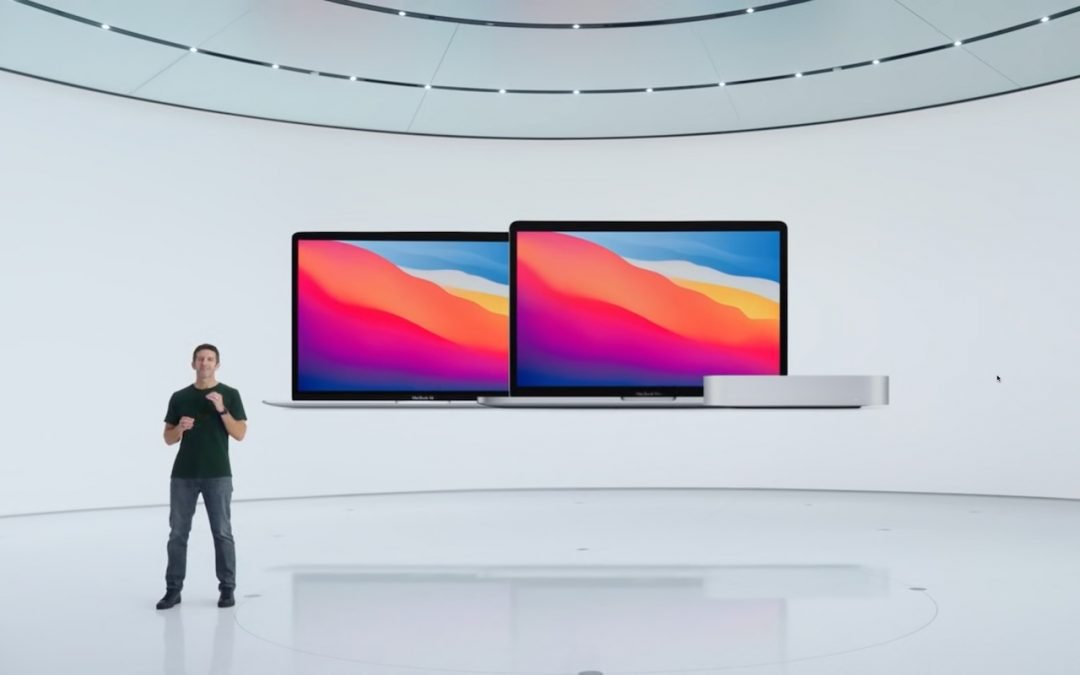
Apple Unveils New M1-Powered MacBook Air, MacBook Pro, and Mac mini

Apple Unveils New M1-Powered MacBook Air, MacBook Pro, and Mac mini

by Terry McAdams | Nov 1, 2020 | Mac, Mac mini, MacBook Air, MacBook Pro

Continuing its pandemic-driven approach of short, focused announcements, Apple once again took to the Internet to stream its “One More Thing” event. On center stage this time was the Mac, or specifically, three Macs, all of which replace the longstanding Intel chip...
Want Better Goals? Customize Your Move, Exercise, and Stand Rings in watchOS 7

Want Better Goals? Customize Your Move, Exercise, and Stand Rings in watchOS 7

by Terry McAdams | Oct 28, 2020 | Apple Watch, Tip

Ever since Apple introduced the Activity app to watchOS, you’ve been able to adjust your Move goal, which is measured in kilocalories, but your Exercise goal was locked at 30 minutes and the Stand goal at 12 hours. In watchOS 7, you can finally change these last two....
Remember to Enable Text Message Forwarding When You Get a New Mac or iPad

Remember to Enable Text Message Forwarding When You Get a New Mac or iPad

by Terry McAdams | Oct 22, 2020 | iPad, iPhone, Mac, Tip, troubleshooting

You’ve long had text messages forwarding from your iPhone to your Mac and iPad, but after you get a new device, it might be a while before you realize that it’s not receiving texts sent to your iPhone. It turns out that, when you get a new Apple device, you must...
« Older Entries
Next Entries »

Archives

Categories

Terms and Conditions   |   Return and Shipping Policy   |   Privacy Policy
MacTech Solutions LLC DBA MacTech Solutions™
Copyright © MacTech Solutions, LLC   |   All Rights Reserved.

The MacTech Solutions logo is property of MacTech Solutions, LLC, a Texas Limited liability company. All other logos and trademarks are the property of their respective owners. Apple, the Apple logo, iPad, iPad Pro, iPod, Mac, MacBook Air, and MacBook Pro are trademarks of Apple Inc., registered in the U.S. and other countries.

Our Location

4020 Rhea Rd, Suite 3B
Wichita Falls, TX 76308
(940) 767-MACS (6227)

Hours

Monday-Friday: 10-6
Saturday: Closed
Sunday: Closed
Terms and Conditions | Privacy Policy

MacTech Solutions LLC DBA MacTech Solutions™
Copyright © MacTech Solutions, LLC   |   All Rights Reserved.

The MacTech Solutions logo is property of MacTech Solutions, LLC, a Texas Limited liability company. All other logos and trademarks are the property of their respective owners. Apple, the Apple logo, iPad, iPad Pro, iPod, Mac, MacBook Air, and MacBook Pro are trademarks of Apple Inc., registered in the U.S. and other countries.