(940) 767-6227
  • Facebook
  • X
  • RSS
  • Facebook
  • X
  • RSS
0 Items
MacTech Solutions
  • Home
  • Products
    • Mac
      • MacBook Air
        • MacBook Air 13-inch M2
        • MacBook Air 13-inch M3
        • MacBook Air 15-inch M3
      • MacBook Pro
        • MacBook Pro 14-inch M4
        • MacBook Pro 14-inch M4 Pro
        • MacBook Pro 16-inch M4
      • iMac
        • iMac 24-inch M4
      • Mac Mini
        • Mac mini M4
      • Mac Studio
      • Mac Pro
      • Apple Displays
        • Pro Display XDR
        • Studio Display
    • iPad
      • iPad
      • iPad mini
      • iPad Pro
        • iPad Pro M4 11-inch
        • iPad Pro M4 13-inch
      • iPad Air
        • iPad Air M2 11-inch
        • iPad Air M2 13-Inch
      • Apple Pencil
        • Apple Pencil (USB-C)
      • Keyboards
        • Smart Keyboard
        • Smart Keyboard Folio
        • iPad Magic Keyboard
    • Apple Watch
      • Apple Watch SE
      • Apple Watch Series 9
      • Apple Watch Ultra 2
    • iPod touch
    • Apple TV
      • Apple TV
      • Apple TV 4K
    • Airpods
      • AirPods Max
      • Airpods Pro (2nd Generation)
      • AirPods 4
      • AirPods 4 with Active Noice Cancellation
      • AirPods (3rd Generation)
      • AirPods (2nd Generation)
    • HomePod
      • HomePod mini
    • AppleCare+
    • Sonos
    • Adobe
      • Creative Cloud for Education
  • Service
    • Apple Authorized Service
    • Remote Support
  • Trade Ins
  • Classes & Events
  • About Us
    • Newsletter Sign Up
    • MacTech Solutions
    • The Team
    • Contact Us
  • Blog
Select Page
What to Do If You Run Low on iCloud Storage Space

What to Do If You Run Low on iCloud Storage Space

by Terry McAdams | May 5, 2020 | Backup, Email, How-To, iCloud, iCloud Drive, iOS, Mac, Tip, troubleshooting

By default, Apple gives every iCloud user 5 GB of storage space. That disappears quickly, given how it’s shared between iCloud Mail, iCloud Drive, iCloud Photos, Messages, and iCloud-enabled apps. Apple will, of course, sell you more iCloud space. $0.99 per month gets...
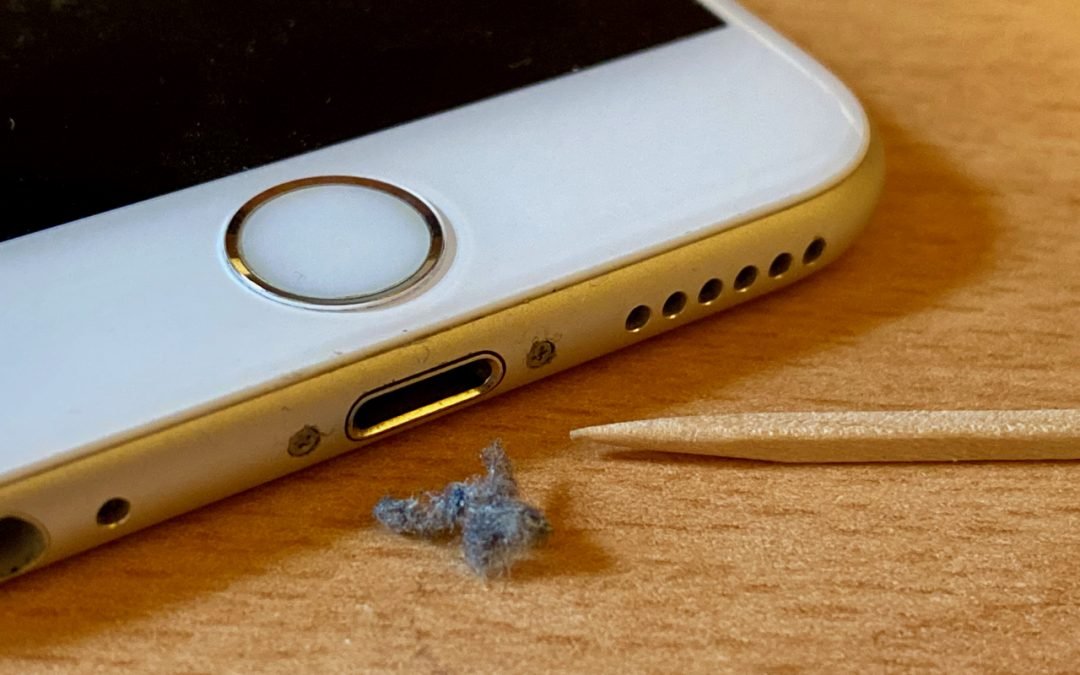
iPhone Not Charging Reliably? Clean Its Lightning Port with a Toothpick

iPhone Not Charging Reliably? Clean Its Lightning Port with a Toothpick

by Terry McAdams | May 4, 2020 | Battery, iPhone, Tip, troubleshooting

If you’re plugging your iPhone in regularly but getting low-battery warnings when you shouldn’t, consider the possibility that something is preventing your iPhone from charging successfully while plugged in. If there’s no lightning bolt badge on the battery icon when...
Having Mac Troubles? Apple Diagnostics May Help Identify the Issue

Having Mac Troubles? Apple Diagnostics May Help Identify the Issue

by Terry McAdams | Apr 29, 2020 | How-To, Mac, troubleshooting

If your Mac is acting up and you suspect a hardware problem, there’s an easy first step that you can—and should—try before calling for tech support: Apple Diagnostics. (On Mac models released before June 2013, Apple instead included a similar set of diagnostics called...
Strategies for Moving from Mojave to Catalina

Strategies for Moving from Mojave to Catalina

by Terry McAdams | Feb 3, 2020 | Mac, troubleshooting, Upgrade

For some Mac users, macOS 10.15 Catalina is no longer a choice. That’s because the new 16-inch MacBook Pro and the 2019 Mac Pro that Apple released late last year ship with Catalina installed and can’t run any previous version of macOS. But for most people, it’s time...
Data Backup Strategies Go Only So Far—What’s Your Plan If Your Mac Dies?

Data Backup Strategies Go Only So Far—What’s Your Plan If Your Mac Dies?

by Terry McAdams | Jul 21, 2019 | Backup, Mac, troubleshooting

We assume you have a backup strategy. Hopefully, it includes a bootable duplicate to minimize downtime in the event of a drive failure, a Time Machine or other versioned backup to address the problem of a deleted or corrupted file, and offsite backup to ensure that...
Here’s What You Need to Know about the Butterfly Keyboard

Here’s What You Need to Know about the Butterfly Keyboard

by Terry McAdams | Jun 3, 2019 | MacBook, MacBook Air, MacBook Pro, troubleshooting

When Apple introduced the 12-inch MacBook in April 2015, the machine was the thinnest Mac ever, with a tapered design that starts at a mere 3.5 mm and grows only to 13.1 mm. A change from previous laptop models that made such an incredibly thin design possible was a...
« Older Entries
Next Entries »

Archives

Categories

Terms and Conditions   |   Return and Shipping Policy   |   Privacy Policy
MacTech Solutions LLC DBA MacTech Solutions™
Copyright © MacTech Solutions, LLC   |   All Rights Reserved.

The MacTech Solutions logo is property of MacTech Solutions, LLC, a Texas Limited liability company. All other logos and trademarks are the property of their respective owners. Apple, the Apple logo, iPad, iPad Pro, iPod, Mac, MacBook Air, and MacBook Pro are trademarks of Apple Inc., registered in the U.S. and other countries.

Our Location

4020 Rhea Rd, Suite 3B
Wichita Falls, TX 76308
(940) 767-MACS (6227)

Hours

Monday-Friday: 10-6
Saturday: Closed
Sunday: Closed
Terms and Conditions | Privacy Policy

MacTech Solutions LLC DBA MacTech Solutions™
Copyright © MacTech Solutions, LLC   |   All Rights Reserved.

The MacTech Solutions logo is property of MacTech Solutions, LLC, a Texas Limited liability company. All other logos and trademarks are the property of their respective owners. Apple, the Apple logo, iPad, iPad Pro, iPod, Mac, MacBook Air, and MacBook Pro are trademarks of Apple Inc., registered in the U.S. and other countries.