(940) 767-6227
  • Facebook
  • X
  • RSS
  • Facebook
  • X
  • RSS
MacTech Solutions
  • Home
  • Managed IT Services
  • Products
    • Mac
      • MacBook Air
        • MacBook Air 13-inch M5
        • MacBook Air 15-inch M5
      • MacBook Pro
        • MacBook Pro 14-inch M5
        • MacBook Pro 14-inch M5 Pro
        • MacBook Pro 16-inch M5
      • iMac
        • iMac 24-inch M4
      • Mac Mini
        • Mac mini M4
      • Mac Studio
      • Mac Pro
      • Apple Displays
        • Pro Display XDR
        • Studio Display
    • iPad
      • iPad
      • iPad mini
      • iPad Pro
        • iPad Pro M4 11-inch
        • iPad Pro M4 13-inch
      • iPad Air
        • iPad Air M2 11-inch
        • iPad Air M2 13-Inch
      • Apple Pencil
        • Apple Pencil (USB-C)
      • Keyboards
        • Smart Keyboard
        • Smart Keyboard Folio
        • iPad Magic Keyboard
    • Apple Watch
      • Apple Watch SE
      • Apple Watch Series 9
      • Apple Watch Ultra 2
    • iPod touch
    • Apple TV
      • Apple TV
      • Apple TV 4K
    • Airpods
      • AirPods Max
      • Airpods Pro (2nd Generation)
      • AirPods 4
      • AirPods 4 with Active Noice Cancellation
      • AirPods (3rd Generation)
      • AirPods (2nd Generation)
    • HomePod
      • HomePod mini
    • AppleCare+
    • Sonos
    • Adobe
      • Creative Cloud for Education
  • Service
    • Apple Authorized Service
    • Remote Support
  • Classes & Events
  • Trade Ins
  • About Us
    • Newsletter Sign Up
    • MacTech Solutions
    • The Team
    • Contact Us
  • Blog
Select Page
Find What’s Filling Your Disk with OmniDiskSweeper

Find What’s Filling Your Disk with OmniDiskSweeper

by Terry McAdams | Sep 4, 2026 | Mac, Tip, troubleshooting

It’s annoying when your Mac tells you you’re low on disk space and you can’t imagine what could be occupying it. Or maybe you know you’re running low—a good rule of thumb is to keep at least 10% of the drive free—but aren’t sure which files or folders are hogging the...
How AI Vulnerability Detection Changes Software Security

How AI Vulnerability Detection Changes Software Security

by Terry McAdams | Jun 5, 2026 | AI, Security

The latest generation of AI models has fundamentally changed how quickly security vulnerabilities can be found in software, for both defenders and attackers. Understanding what’s happening helps explain why we keep emphasizing the importance of keeping your devices...
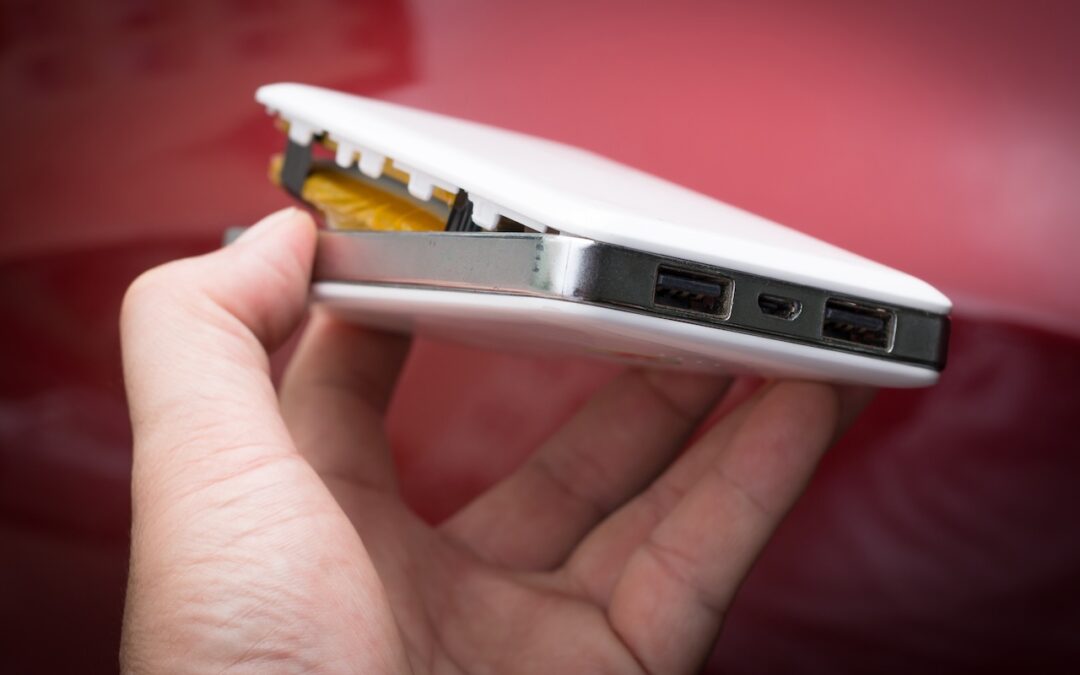
Today’s Fire Prevention Tip: Avoid Cheap Lithium-Ion Batteries

Today’s Fire Prevention Tip: Avoid Cheap Lithium-Ion Batteries

by Terry McAdams | May 1, 2026 | Battery, Tip

We always recommend buying from reputable manufacturers rather than no-name brands, especially for products with lithium-ion batteries, such as power banks, Bluetooth speakers, flashlights, power tools, e-bikes, and more. In a 2025 study, industrial scanning company...
No More Ransom Website Offers Ransomware Decryption Tools

No More Ransom Website Offers Ransomware Decryption Tools

by Terry McAdams | Sep 18, 2024 | Security, Tip

We’ve written in the past about how Apple-only companies can protect themselves from ransomware (strong security, isolated backups, monitoring software), but realistically, it’s primarily a threat to computers running Windows and Linux. If you, or anyone you know, is...
Remember the Magnifier App When You Need to Read Tiny Text

Remember the Magnifier App When You Need to Read Tiny Text

by Terry McAdams | Jul 22, 2024 | Camera, iPad, iPhone, productivity, Tip

Trying to make out a tiny serial number or some fine print you can barely read can be frustrating. Years ago, Apple added a magnifier mode to its accessibility options and turned the feature into a standalone app in iOS 14. You can find the Magnifier app in the...


Archives

Categories

Terms and Conditions   |   Return and Shipping Policy   |   Privacy Policy
MacTech Solutions LLC DBA MacTech Solutions™
Copyright © MacTech Solutions, LLC   |   All Rights Reserved.

The MacTech Solutions logo is property of MacTech Solutions, LLC, a Texas Limited liability company. All other logos and trademarks are the property of their respective owners. Apple, the Apple logo, iPad, iPad Pro, iPod, Mac, MacBook Air, and MacBook Pro are trademarks of Apple Inc., registered in the U.S. and other countries.

Our Location

4020 Rhea Rd, Suite 3B
Wichita Falls, TX 76308
(940) 767-MACS (6227)

Hours

Monday-Friday: 10-6
Saturday: Closed
Sunday: Closed
Terms and Conditions | Privacy Policy

MacTech Solutions LLC DBA MacTech Solutions™
Copyright © MacTech Solutions, LLC   |   All Rights Reserved.

The MacTech Solutions logo is property of MacTech Solutions, LLC, a Texas Limited liability company. All other logos and trademarks are the property of their respective owners. Apple, the Apple logo, iPad, iPad Pro, iPod, Mac, MacBook Air, and MacBook Pro are trademarks of Apple Inc., registered in the U.S. and other countries.