(940) 767-6227
  • Facebook
  • X
  • RSS
  • Facebook
  • X
  • RSS
0 Items
MacTech Solutions
  • Home
  • Products
    • Mac
      • MacBook Air
        • MacBook Air 13-inch M5
        • MacBook Air 15-inch M5
      • MacBook Pro
        • MacBook Pro 14-inch M5
        • MacBook Pro 14-inch M5 Pro
        • MacBook Pro 16-inch M5
      • iMac
        • iMac 24-inch M4
      • Mac Mini
        • Mac mini M4
      • Mac Studio
      • Mac Pro
      • Apple Displays
        • Pro Display XDR
        • Studio Display
    • iPad
      • iPad
      • iPad mini
      • iPad Pro
        • iPad Pro M4 11-inch
        • iPad Pro M4 13-inch
      • iPad Air
        • iPad Air M2 11-inch
        • iPad Air M2 13-Inch
      • Apple Pencil
        • Apple Pencil (USB-C)
      • Keyboards
        • Smart Keyboard
        • Smart Keyboard Folio
        • iPad Magic Keyboard
    • Apple Watch
      • Apple Watch SE
      • Apple Watch Series 9
      • Apple Watch Ultra 2
    • iPod touch
    • Apple TV
      • Apple TV
      • Apple TV 4K
    • Airpods
      • AirPods Max
      • Airpods Pro (2nd Generation)
      • AirPods 4
      • AirPods 4 with Active Noice Cancellation
      • AirPods (3rd Generation)
      • AirPods (2nd Generation)
    • HomePod
      • HomePod mini
    • AppleCare+
    • Sonos
    • Adobe
      • Creative Cloud for Education
  • Service
    • Apple Authorized Service
    • Remote Support
  • Trade Ins
  • Classes & Events
  • About Us
    • Newsletter Sign Up
    • MacTech Solutions
    • The Team
    • Contact Us
  • Blog
Select Page
How to Sync Your Text Messages across All Your Apple Devices

How to Sync Your Text Messages across All Your Apple Devices

by Terry McAdams | Apr 24, 2024 | How-To, iPad, iPhone, Mac, Messages, productivity

Although many of us think of Messages as an iPhone app, Apple’s platform integration lets you read and reply to conversations in Messages on other Apple devices, including the Mac and iPad. All your devices must have the correct settings to make this work reliably. We...
Tips for Working with Mac Display Resolutions

Tips for Working with Mac Display Resolutions

by Terry McAdams | Apr 23, 2024 | Mac, productivity, Tip

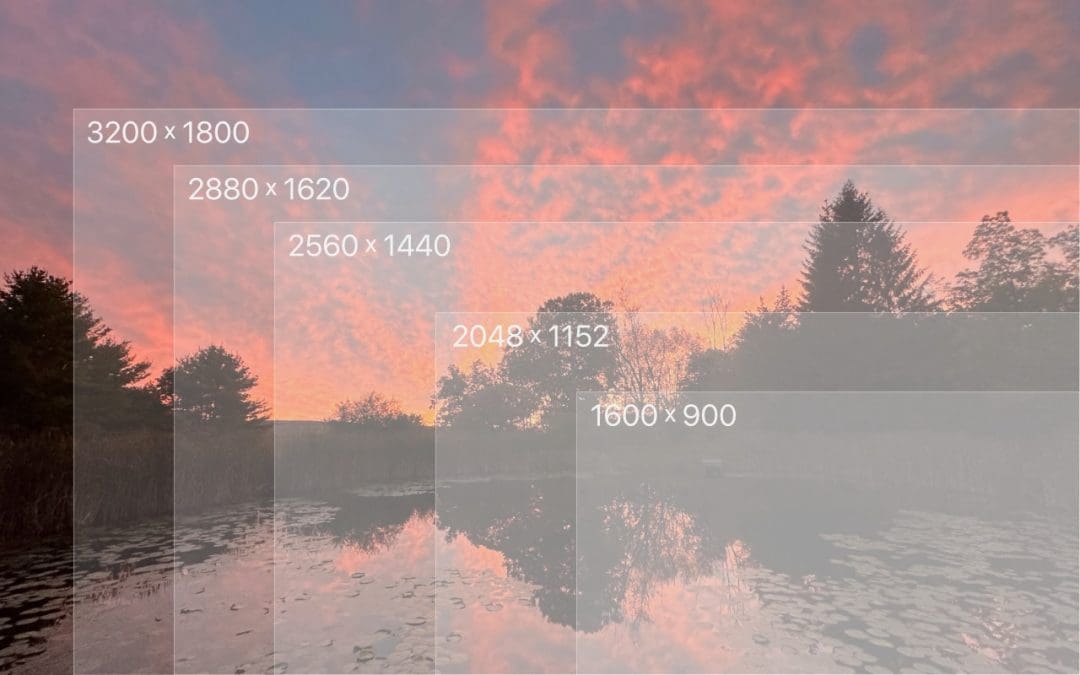
You can change the resolution of your Mac’s screen—how many pixels appear—to make text and graphics larger and easier to see or smaller to fit more content onscreen. In System Settings > Displays, Apple shows thumbnails for five likely possibilities. Hover the...
Want an Event List in Apple’s Calendar App? Try This Trick

Want an Event List in Apple’s Calendar App? Try This Trick

by Terry McAdams | Apr 4, 2024 | Calendar, Mac, productivity, Tip

Along with day, week, month, and year views, most calendar apps offer the option of a simple chronological list of events, which can be a handy way to see what’s coming up. Apple’s Calendar app on the Mac is unfortunately not among those apps. However, there is a...
Six Reasons Why You Should Restart Your Mac Periodically

Six Reasons Why You Should Restart Your Mac Periodically

by Terry McAdams | Apr 3, 2024 | Mac, Security, troubleshooting

Long ago, before macOS was as stable as it is today, Mac users restarted their Macs regularly. Back then, Macs couldn’t sleep, either, so it was common for users to shut down at the end of the day and start up the next morning, effectively restarting daily. With...
Take Advantage of the Reference Library in Your Mac

Take Advantage of the Reference Library in Your Mac

by Terry McAdams | Apr 1, 2024 | Dictionary, How-To, Mac, productivity

You may be used to Mac apps using red underlines to mark misspelled words, but did you know that macOS has also long included a fully featured Dictionary app? It provides quick access to definitions and synonyms in the New Oxford American Dictionary and the Oxford...
For the Best Mac Webcam, Use Your iPhone

For the Best Mac Webcam, Use Your iPhone

by Terry McAdams | Mar 25, 2024 | iPhone, Mac, MagSafe, productivity

The near-ubiquity of videoconferencing is a lasting effect of the pandemic. The ease of gathering a group virtually usually more than makes up for the downsides. Despite that, many people still appear in video calls with low-resolution, poorly lit video that makes the...
« Older Entries
Next Entries »

Archives

Categories

Terms and Conditions   |   Return and Shipping Policy   |   Privacy Policy
MacTech Solutions LLC DBA MacTech Solutions™
Copyright © MacTech Solutions, LLC   |   All Rights Reserved.

The MacTech Solutions logo is property of MacTech Solutions, LLC, a Texas Limited liability company. All other logos and trademarks are the property of their respective owners. Apple, the Apple logo, iPad, iPad Pro, iPod, Mac, MacBook Air, and MacBook Pro are trademarks of Apple Inc., registered in the U.S. and other countries.

Our Location

4020 Rhea Rd, Suite 3B
Wichita Falls, TX 76308
(940) 767-MACS (6227)

Hours

Monday-Friday: 10-6
Saturday: Closed
Sunday: Closed
Terms and Conditions | Privacy Policy

MacTech Solutions LLC DBA MacTech Solutions™
Copyright © MacTech Solutions, LLC   |   All Rights Reserved.

The MacTech Solutions logo is property of MacTech Solutions, LLC, a Texas Limited liability company. All other logos and trademarks are the property of their respective owners. Apple, the Apple logo, iPad, iPad Pro, iPod, Mac, MacBook Air, and MacBook Pro are trademarks of Apple Inc., registered in the U.S. and other countries.