(940) 767-6227
  • Facebook
  • X
  • RSS
  • Facebook
  • X
  • RSS
MacTech Solutions
  • Home
  • Managed IT Services
  • Products
    • Mac
      • MacBook Air
        • MacBook Air 13-inch M5
        • MacBook Air 15-inch M5
      • MacBook Pro
        • MacBook Pro 14-inch M5
        • MacBook Pro 14-inch M5 Pro
        • MacBook Pro 16-inch M5
      • iMac
        • iMac 24-inch M4
      • Mac Mini
        • Mac mini M4
      • Mac Studio
      • Mac Pro
      • Apple Displays
        • Pro Display XDR
        • Studio Display
    • iPad
      • iPad
      • iPad mini
      • iPad Pro
        • iPad Pro M4 11-inch
        • iPad Pro M4 13-inch
      • iPad Air
        • iPad Air M2 11-inch
        • iPad Air M2 13-Inch
      • Apple Pencil
        • Apple Pencil (USB-C)
      • Keyboards
        • Smart Keyboard
        • Smart Keyboard Folio
        • iPad Magic Keyboard
    • Apple Watch
      • Apple Watch SE
      • Apple Watch Series 9
      • Apple Watch Ultra 2
    • iPod touch
    • Apple TV
      • Apple TV
      • Apple TV 4K
    • Airpods
      • AirPods Max
      • Airpods Pro (2nd Generation)
      • AirPods 4
      • AirPods 4 with Active Noice Cancellation
      • AirPods (3rd Generation)
      • AirPods (2nd Generation)
    • HomePod
      • HomePod mini
    • AppleCare+
    • Sonos
    • Adobe
      • Creative Cloud for Education
  • Service
    • Apple Authorized Service
    • Remote Support
  • Classes & Events
  • Trade Ins
  • About Us
    • Newsletter Sign Up
    • MacTech Solutions
    • The Team
    • Contact Us
  • Blog
Select Page
Find Files in the Finder Better by Specifying a Search Scope

Find Files in the Finder Better by Specifying a Search Scope

by Terry McAdams | Jun 22, 2020 | Finder, Mac, productivity, Tip

This isn’t about periscopes or mouthwash—when it comes to searching, a scope is the area in which a search takes place. When you use the Search field in a Finder window to look for files and folders, you have the choice of two scopes: This Mac or the current folder....
AirDrop Reception Not Working? Here’s the Likely Fix

AirDrop Reception Not Working? Here’s the Likely Fix

by Terry McAdams | Jun 19, 2020 | iOS, Tip, troubleshooting

AirDrop has become a fast and reliable way to transfer data from one iPhone to another that’s nearby. Just tap the share icon and in iOS 13’s activity view, either tap an AirDrop shortcut in the top row or tap AirDrop in the second row and select choose a person or...
Approve App Authentication Requests with Your Apple Watch in Catalina

Approve App Authentication Requests with Your Apple Watch in Catalina

by Terry McAdams | Jun 18, 2020 | Apple Watch, Mac, passwords, Security, Tip

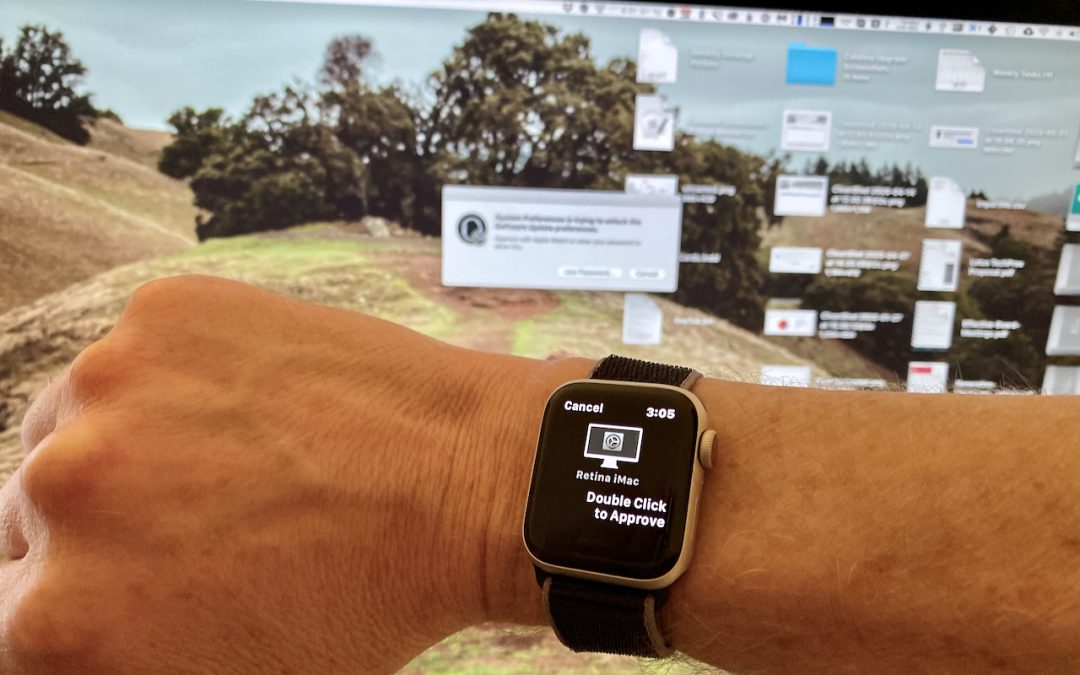
Tired of typing your admin account password whenever you try to install software or change security settings on your Mac? A new feature in macOS 10.15 Catalina removes that requirement for Apple Watch owners. In System Preferences > Security & Privacy >...
Use Guided Access to Let Kids and Others Use Your iPhone Temporarily

Use Guided Access to Let Kids and Others Use Your iPhone Temporarily

by Terry McAdams | Jun 17, 2020 | How-To, iOS, iPad, iPhone

Let’s get one thing straight. You know that you should never, ever share your iPhone or iPad passcode with anyone you don’t trust implicitly, like a spouse or adult child, right? That’s because, with your iOS passcode, someone could change your Apple ID password, and...
How to Ask for Tech Support So You Get Good Answers Quickly

How to Ask for Tech Support So You Get Good Answers Quickly

by Terry McAdams | Jun 16, 2020 | Backup, How-To, Mac, Time Machine

Need help with something? On occasion, we all need tech support. Speaking as the people who are sometimes on the other end of those requests for help, we have some suggestions on how to get the support you need as quickly as possible. For instance, think about what we...
« Older Entries
Next Entries »

Archives

Categories

Terms and Conditions   |   Return and Shipping Policy   |   Privacy Policy
MacTech Solutions LLC DBA MacTech Solutions™
Copyright © MacTech Solutions, LLC   |   All Rights Reserved.

The MacTech Solutions logo is property of MacTech Solutions, LLC, a Texas Limited liability company. All other logos and trademarks are the property of their respective owners. Apple, the Apple logo, iPad, iPad Pro, iPod, Mac, MacBook Air, and MacBook Pro are trademarks of Apple Inc., registered in the U.S. and other countries.

Our Location

4020 Rhea Rd, Suite 3B
Wichita Falls, TX 76308
(940) 767-MACS (6227)

Hours

Monday-Friday: 10-6
Saturday: Closed
Sunday: Closed
Terms and Conditions | Privacy Policy

MacTech Solutions LLC DBA MacTech Solutions™
Copyright © MacTech Solutions, LLC   |   All Rights Reserved.

The MacTech Solutions logo is property of MacTech Solutions, LLC, a Texas Limited liability company. All other logos and trademarks are the property of their respective owners. Apple, the Apple logo, iPad, iPad Pro, iPod, Mac, MacBook Air, and MacBook Pro are trademarks of Apple Inc., registered in the U.S. and other countries.