(940) 767-6227
  • Facebook
  • X
  • RSS
  • Facebook
  • X
  • RSS
MacTech Solutions
  • Home
  • Managed IT Services
  • Products
    • Mac
      • MacBook Air
        • MacBook Air 13-inch M5
        • MacBook Air 15-inch M5
      • MacBook Pro
        • MacBook Pro 14-inch M5
        • MacBook Pro 14-inch M5 Pro
        • MacBook Pro 16-inch M5
      • iMac
        • iMac 24-inch M4
      • Mac Mini
        • Mac mini M4
      • Mac Studio
      • Mac Pro
      • Apple Displays
        • Pro Display XDR
        • Studio Display
    • iPad
      • iPad
      • iPad mini
      • iPad Pro
        • iPad Pro M4 11-inch
        • iPad Pro M4 13-inch
      • iPad Air
        • iPad Air M2 11-inch
        • iPad Air M2 13-Inch
      • Apple Pencil
        • Apple Pencil (USB-C)
      • Keyboards
        • Smart Keyboard
        • Smart Keyboard Folio
        • iPad Magic Keyboard
    • Apple Watch
      • Apple Watch SE
      • Apple Watch Series 9
      • Apple Watch Ultra 2
    • iPod touch
    • Apple TV
      • Apple TV
      • Apple TV 4K
    • Airpods
      • AirPods Max
      • Airpods Pro (2nd Generation)
      • AirPods 4
      • AirPods 4 with Active Noice Cancellation
      • AirPods (3rd Generation)
      • AirPods (2nd Generation)
    • HomePod
      • HomePod mini
    • AppleCare+
    • Sonos
    • Adobe
      • Creative Cloud for Education
  • Service
    • Apple Authorized Service
    • Remote Support
  • Trade Ins
    • Classes & Events
  • About Us
    • Newsletter Sign Up
    • MacTech Solutions
    • The Team
    • Contact Us
  • Blog
Select Page
Avoid Inclement Weather by Enabling Notifications in iOS 15’s Weather App

Avoid Inclement Weather by Enabling Notifications in iOS 15’s Weather App

by Terry McAdams | Dec 1, 2021 | iPhone, productivity, Tip

Thanks to Apple’s 2020 acquisition of weather company Dark Sky, the iPhone’s Weather app has learned some new tricks in iOS 15. (It still isn’t available on the iPad, oddly.) Most obvious is its addition of weather maps that can show precipitation, temperature, and...
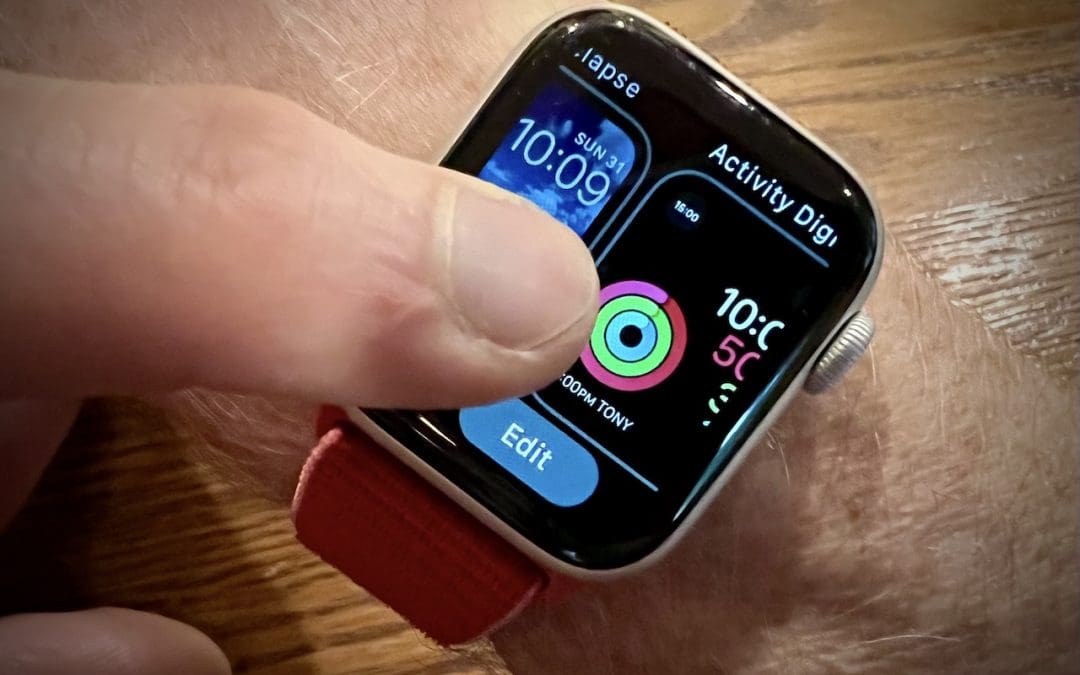
With Apple Watch Faces, Too Much Choice Can Be Confusing

With Apple Watch Faces, Too Much Choice Can Be Confusing

by Terry McAdams | Nov 23, 2021 | Apple Watch, Tip

The Apple Watch has a lot to offer older people, including heart rate monitoring, atrial fibrillation detection, fall detection, and electrocardiogram recording. But if you are—or are helping someone who is—of the generation where watches once did nothing beyond...
Use Visual Look Up in Photos in iOS 15 to Identify Plants, Pets, and More

Use Visual Look Up in Photos in iOS 15 to Identify Plants, Pets, and More

by Terry McAdams | Nov 8, 2021 | Photos, productivity, Tip

Have you ever wanted to identify a plant, flower, or pet breed, or find out what that famous painting is called? Us too. In iOS 15 and iPadOS 15, Apple added a new AI-driven feature called Visual Look Up that provides more information about photos of plants, flowers,...
Safari 15.1 Reverses Course, Reverts to Old Tab Interface

Safari 15.1 Reverses Course, Reverts to Old Tab Interface

by Terry McAdams | Nov 1, 2021 | Mac, Safari, Tip

With the betas of Safari 15 on the Mac and iPad, Apple experimented with a variety of interface tweaks related to tabs. By the time Safari 15 shipped, however, Apple had pulled back on the more radical changes from the betas, offering the new Compact Tab Bar layout...
When Migrating to a New iPhone or iPad, Try Quick Start First

When Migrating to a New iPhone or iPad, Try Quick Start First

by Terry McAdams | Oct 19, 2021 | iPad, iPhone, Tip, Upgrade

You have a new iPhone or iPad—congratulations! When transferring your data to the new device, you have three options: Quick Start, an iCloud backup, or a Mac backup. All will work, but they don’t quite provide the same end result (particularly if you didn’t encrypt...
After Upgrading to iOS 15, Check Do Not Disturb in Focus Settings

After Upgrading to iOS 15, Check Do Not Disturb in Focus Settings

by Terry McAdams | Oct 12, 2021 | iOS, Tip, troubleshooting

In iOS 15 and iPadOS 15, Apple expanded the concept of Do Not Disturb to what it calls Focus. You can create a Focus for different types of activities, so only specific people and apps can break through your cone of silence at appropriate times. Focus subsumes the old...
« Older Entries
Next Entries »

Archives

Categories

Terms and Conditions   |   Return and Shipping Policy   |   Privacy Policy
MacTech Solutions LLC DBA MacTech Solutions™
Copyright © MacTech Solutions, LLC   |   All Rights Reserved.

The MacTech Solutions logo is property of MacTech Solutions, LLC, a Texas Limited liability company. All other logos and trademarks are the property of their respective owners. Apple, the Apple logo, iPad, iPad Pro, iPod, Mac, MacBook Air, and MacBook Pro are trademarks of Apple Inc., registered in the U.S. and other countries.

Our Location

4020 Rhea Rd, Suite 3B
Wichita Falls, TX 76308
(940) 767-MACS (6227)

Hours

Monday-Friday: 10-6
Saturday: Closed
Sunday: Closed
Terms and Conditions | Privacy Policy

MacTech Solutions LLC DBA MacTech Solutions™
Copyright © MacTech Solutions, LLC   |   All Rights Reserved.

The MacTech Solutions logo is property of MacTech Solutions, LLC, a Texas Limited liability company. All other logos and trademarks are the property of their respective owners. Apple, the Apple logo, iPad, iPad Pro, iPod, Mac, MacBook Air, and MacBook Pro are trademarks of Apple Inc., registered in the U.S. and other countries.