(940) 767-6227
  • Facebook
  • X
  • RSS
  • Facebook
  • X
  • RSS
0 Items
MacTech Solutions
  • Home
  • Products
    • Mac
      • MacBook Air
        • MacBook Air 13-inch M5
        • MacBook Air 15-inch M5
      • MacBook Pro
        • MacBook Pro 14-inch M5
        • MacBook Pro 14-inch M5 Pro
        • MacBook Pro 16-inch M5
      • iMac
        • iMac 24-inch M4
      • Mac Mini
        • Mac mini M4
      • Mac Studio
      • Mac Pro
      • Apple Displays
        • Pro Display XDR
        • Studio Display
    • iPad
      • iPad
      • iPad mini
      • iPad Pro
        • iPad Pro M4 11-inch
        • iPad Pro M4 13-inch
      • iPad Air
        • iPad Air M2 11-inch
        • iPad Air M2 13-Inch
      • Apple Pencil
        • Apple Pencil (USB-C)
      • Keyboards
        • Smart Keyboard
        • Smart Keyboard Folio
        • iPad Magic Keyboard
    • Apple Watch
      • Apple Watch SE
      • Apple Watch Series 9
      • Apple Watch Ultra 2
    • iPod touch
    • Apple TV
      • Apple TV
      • Apple TV 4K
    • Airpods
      • AirPods Max
      • Airpods Pro (2nd Generation)
      • AirPods 4
      • AirPods 4 with Active Noice Cancellation
      • AirPods (3rd Generation)
      • AirPods (2nd Generation)
    • HomePod
      • HomePod mini
    • AppleCare+
    • Sonos
    • Adobe
      • Creative Cloud for Education
  • Service
    • Apple Authorized Service
    • Remote Support
  • Trade Ins
  • Classes & Events
  • About Us
    • Newsletter Sign Up
    • MacTech Solutions
    • The Team
    • Contact Us
  • Blog
Select Page
How to Stop Forgetting Your Apple Gear with “Notify When Left Behind”

How to Stop Forgetting Your Apple Gear with “Notify When Left Behind”

by Terry McAdams | Jan 11, 2022 | How-To, privacy, Security, troubleshooting

Apple’s Find My technology is a lifesaver when it works, enabling you to locate and potentially retrieve lost or stolen devices. It’s not perfect, even with the addition of the Find My Network, which drafts other nearby Apple devices to relay the location of a lost...
Pay Attention to the iPhone’s Emergency SOS Auto Call Feature

Pay Attention to the iPhone’s Emergency SOS Auto Call Feature

by Terry McAdams | Dec 7, 2021 | Emergency SOS, iPhone, Tip, troubleshooting

Did you know that pressing and holding the side button and one of the volume buttons on an iPhone 8 or later brings up a screen that lets you power your iPhone off, show your medical ID, and invoke Emergency SOS? (On earlier iPhones, press the side or top button five...
Shrink Apps to Prevent the MacBook Pro Notch from Obscuring App Controls

Shrink Apps to Prevent the MacBook Pro Notch from Obscuring App Controls

by Terry McAdams | Dec 1, 2021 | MacBook Pro, Tip, troubleshooting

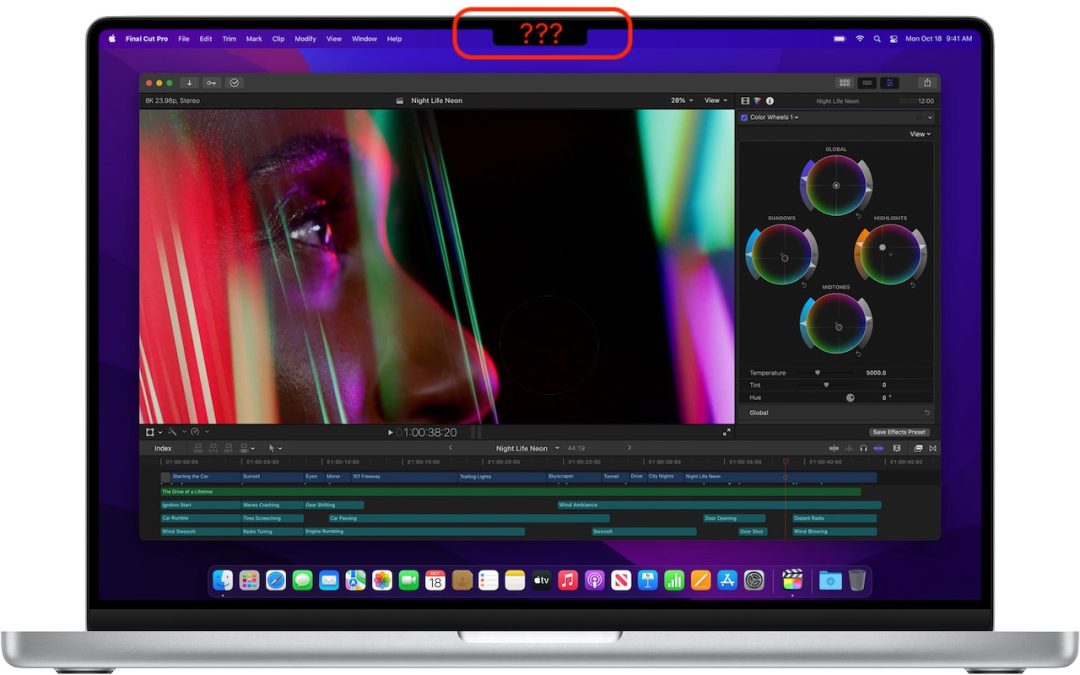
The new 14-inch and 16-inch MacBook Pro models feature a camera housing built into the screen, resulting in a notch like that on the iPhone. Most developers are updating their apps to ensure that no controls or menu bar items appear blocked or hidden by the notch, but...
Beware the Bulging Battery! (And What to Do If Yours Expands)

Beware the Bulging Battery! (And What to Do If Yours Expands)

by Terry McAdams | Oct 28, 2021 | Battery, iPad, iPhone, Mac, troubleshooting

We’ve been seeing a spate of bulging batteries of late, both in Mac laptops and iPhones. A bulging battery is a Very Bad Thing and must be dealt with immediately because it could catch fire or even explode. As lithium-ion batteries age, the chemical reactions that...
After Upgrading to iOS 15, Check Do Not Disturb in Focus Settings

After Upgrading to iOS 15, Check Do Not Disturb in Focus Settings

by Terry McAdams | Oct 12, 2021 | iOS, Tip, troubleshooting

In iOS 15 and iPadOS 15, Apple expanded the concept of Do Not Disturb to what it calls Focus. You can create a Focus for different types of activities, so only specific people and apps can break through your cone of silence at appropriate times. Focus subsumes the old...
Messages Not Being Delivered to Blue-Bubble Friends? Check Cellular Data

Messages Not Being Delivered to Blue-Bubble Friends? Check Cellular Data

by Terry McAdams | Oct 7, 2021 | iPhone, Messages, Tip, troubleshooting

Here’s a tricky situation that threw one of our clients for a loop recently. Texts they sent in Messages via iMessage (indicated by blue bubbles) to their son, letting him know they were stopping by weren’t being delivered, making their visits a surprise. But other...
« Older Entries
Next Entries »

Archives

Categories

Terms and Conditions   |   Return and Shipping Policy   |   Privacy Policy
MacTech Solutions LLC DBA MacTech Solutions™
Copyright © MacTech Solutions, LLC   |   All Rights Reserved.

The MacTech Solutions logo is property of MacTech Solutions, LLC, a Texas Limited liability company. All other logos and trademarks are the property of their respective owners. Apple, the Apple logo, iPad, iPad Pro, iPod, Mac, MacBook Air, and MacBook Pro are trademarks of Apple Inc., registered in the U.S. and other countries.

Our Location

4020 Rhea Rd, Suite 3B
Wichita Falls, TX 76308
(940) 767-MACS (6227)

Hours

Monday-Friday: 10-6
Saturday: Closed
Sunday: Closed
Terms and Conditions | Privacy Policy

MacTech Solutions LLC DBA MacTech Solutions™
Copyright © MacTech Solutions, LLC   |   All Rights Reserved.

The MacTech Solutions logo is property of MacTech Solutions, LLC, a Texas Limited liability company. All other logos and trademarks are the property of their respective owners. Apple, the Apple logo, iPad, iPad Pro, iPod, Mac, MacBook Air, and MacBook Pro are trademarks of Apple Inc., registered in the U.S. and other countries.